Valero is an open-source tool for storing, restoring, and migrating Kubernetes cluster resources and persistent volumes. Valero provides a way to hold the entire state of a Kubernetes cluster, all its objects and their consistent numbers, store backup files to Cloud storage like AWS S3, and then restore them to a previous state to ensure K8S data resilience, disaster recovery results and easy transport between clusters.
Velero for EKS
Backup EKS cluster using Velero, can be followed by the below path:
- Install Velero in EKS cluster
- AWS CLI is configured with the correct credentials
- S3 bucket created and configured for Velero to communicate for backup and restore
- Prepare AWS S3 bucket and IAM user
# create S3 bucket for Velero
BUCKET=zz-asb-k8s-velero-backup-bucket
REGION=ap-southeast-2

aws s3api create-bucket \
 --bucket $BUCKET \
 --region $REGION \
 --create-bucket-configuration LocationConstraint=$REGION

# create IAM user for Velero
aws iam create-user --user-name velero

cat > velero-policy.json <<EOF
{
 "Version": "2012-10-17",
 "Statement": [
 {
 "Effect": "Allow",
 "Action": [
 "ec2:DescribeVolumes",
 "ec2:DescribeSnapshots",
 "ec2:CreateTags",
 "ec2:CreateVolume",
 "ec2:CreateSnapshot",
 "ec2:DeleteSnapshot"
 ],
 "Resource": "*"
 },
 {
 "Effect": "Allow",
 "Action": [
 "s3:GetObject",
 "s3:DeleteObject",
 "s3:PutObject",
 "s3:AbortMultipartUpload",
 "s3:ListMultipartUploadParts"
 ],
 "Resource": [
 "arn:aws:s3:::${BUCKET}/*"
 ]
 },
 {
 "Effect": "Allow",
 "Action": [
 "s3:ListBucket"
 ],
 "Resource": [
 "arn:aws:s3:::${BUCKET}"
 ]
 }
 ]
}
EOF

aws iam put-user-policy \
 --user-name velero \
 --policy-name velero \
 --policy-document file://velero-policy.json

aws iam create-access-key --user-name velero

vim credentials-velero

[default]
aws_access_key_id=<AWS_ACCESS_KEY_ID>
aws_secret_access_key=<AWS_SECRET_ACCESS_KEY>
- Install Velero
# install Velero with AWS s3 and IAM user cred
velero install \
 --provider aws \
 --bucket $BUCKET \
 --secret-file ./credentials-velero \
 --backup-location-config region=$REGION \
 --snapshot-location-config region=$REGION

# check for Velero deployment status
kubectl get all -n velero
NAME                          READY   STATUS    RESTARTS      AGE
pod/velero-86c547688f-s6l4d   1/1     Running   3 (17m ago)   42h

NAME                     READY   UP-TO-DATE   AVAILABLE   AGE
deployment.apps/velero   1/1     1            1           25d

NAME                                DESIRED   CURRENT   READY   AGE
replicaset.apps/velero-657bc85678   0         0         0       25d
replicaset.apps/velero-86c547688f   1         1         1       42h

# verify Velero version and S3 backup location
velero version
Client:
 Version: v1.11.0
 Git commit: 0da2baa908c88ec3c45da15001f6a4b0bda64ae2
Server:
 Version: v1.11.0

velero backup-location get
NAME      PROVIDER   BUCKET/PREFIX                     PHASE         LAST VALIDATED                  ACCESS MODE   DEFAULT
default   aws        zz-asb-k8s-velero-backup-bucket   available     2024-09-11 06:49:39 +0000 UTC   ReadWrite     true
- Initial namespace based backup and a full cluster backup, then verify backup status
# mamually initiate a cluster full backup and a namespace backup
velero backup logs full-cluster-backup
velero backup create eks-backup --include-namespaces zackblog-dev

velero get backup
NAME                           STATUS            ERRORS   WARNINGS   CREATED                         EXPIRES   STORAGE LOCATION   SELECTOR
eks-backup                     Completed         0        0          2024-10-11 07:17:58 +0000 UTC   29d       default            <none>
full-cluster-backup            Completed         2        0          2024-10-11 07:15:51 +0000 UTC   29d       default            <none>

# check and verify backup details

velero backup logs eks-backup
velero backup describe eks-backup
Name:         eks-backup
Namespace:    velero
Labels:       velero.io/storage-location=default
Annotations:  velero.io/source-cluster-k8s-gitversion=v1.31.1
 velero.io/source-cluster-k8s-major-version=1
 velero.io/source-cluster-k8s-minor-version=31

Phase:  Completed

Namespaces:
 Included:  zackblog-dev
 Excluded:  <none>

Resources:
 Included:        *
 Excluded:        <none>
 Cluster-scoped:  auto
- Restore from previous backup after deleting deployment under a namespace
Now we are going to validate Velero restore from the previous backup, we will first delete the deployment under namespace zackblog-dev and then restore it from the previous backup eks-backup.
# existing resource under namespace
kubectl get all -n zackblog-dev
NAME                           READY   STATUS    RESTARTS       AGE
pod/zackweb-674759b48f-b9frj   1/1     Running   1 (127m ago)   4h10m
pod/zackweb-674759b48f-zl6gq   1/1     Running   1 (127m ago)   4h10m

NAME                      TYPE           CLUSTER-IP       EXTERNAL-IP   PORT(S)        AGE
service/zackweb-service   LoadBalancer   10.111.140.121   <none>        80:31132/TCP   7h56m

NAME                      READY   UP-TO-DATE   AVAILABLE   AGE
deployment.apps/zackweb   2/2     2            2           7h56m

NAME                                 DESIRED   CURRENT   READY   AGE
replicaset.apps/zackweb-55547554f6   0         0         0       7h56m
replicaset.apps/zackweb-5bd544cfb4   0         0         0       7h39m
replicaset.apps/zackweb-674759b48f   2         2         2       4h10m
replicaset.apps/zackweb-f4f74b898    0         0         0       4h13m

# delete deployment
kubectl delete deployments.apps -n zackblog-dev zackweb
deployment.apps "zackweb" deleted
kubectl get all -n zackblog-dev
NAME                      TYPE           CLUSTER-IP       EXTERNAL-IP   PORT(S)        AGE
service/zackweb-service   LoadBalancer   10.111.140.121   <none>        80:31132/TCP   7h57m

# restore via velero
velero restore create --from-backup eks-backup
Restore request "eks-backup-20241011083747" submitted successfully.
Run velero restore describe eks-backup-20241011083747 or velero restore logs eks-backup-20241011083747 for more details.

# verify velero restore status
velero restore get
NAME                        BACKUP       STATUS      STARTED                         COMPLETED                       ERRORS   WARNINGS   CREATED                         SELECTOR
eks-backup-20241011083747   eks-backup   Completed   2024-10-11 08:37:48 +0000 UTC   2024-10-11 08:37:49 +0000 UTC   0        3          2024-10-11 08:37:48 +0000 UTC   <none>

kubectl get all -n zackblog-dev
NAME                           READY   STATUS    RESTARTS   AGE
pod/zackweb-674759b48f-b9frj   1/1     Running   0          18s
pod/zackweb-674759b48f-zl6gq   1/1     Running   0          18s

NAME                      TYPE           CLUSTER-IP       EXTERNAL-IP   PORT(S)        AGE
service/zackweb-service   LoadBalancer   10.111.140.121   <none>        80:31132/TCP   7h58m

NAME                      READY   UP-TO-DATE   AVAILABLE   AGE
deployment.apps/zackweb   2/2     2            2           17s

NAME                                 DESIRED   CURRENT   READY   AGE
replicaset.apps/zackweb-55547554f6   0         0         0       18s
replicaset.apps/zackweb-5bd544cfb4   0         0         0       18s
replicaset.apps/zackweb-674759b48f   2         2         2       18s
replicaset.apps/zackweb-f4f74b898    0         0         0       17s
- Scheduled Backups
Velero can be set to perform scheduled backups at regular intervals, here we will create a scheduled Backup hourly.
velero schedule create daily-backup --schedule "0 * * * *"

# Cron schedules use the following format
# ┌───────────── minute (0 - 59)
# │ ┌───────────── hour (0 - 23)
# │ │ ┌───────────── day of the month (1 - 31)
# │ │ │ ┌───────────── month (1 - 12)
# │ │ │ │ ┌───────────── day of the week (0 - 6) (Sunday to Saturday;
# │ │ │ │ │                        7 is also Sunday on some systems)
# │ │ │ │ │
# │ │ │ │ │
# * * * * *

# validate schedule
velero schedule get
NAME            STATUS    CREATED                         SCHEDULE    BACKUP TTL   LAST BACKUP   SELECTOR   PAUSED
hourly-backup   Enabled   2024-09-16 03:48:52 +0000 UTC   0 * * * *   72h0m0s      45m ago       <none>     false

# check scheduled backup
root@asb:~# velero backup get
NAME                           STATUS            ERRORS   WARNINGS   CREATED                         EXPIRES   STORAGE LOCATION   SELECTOR
eks-backup                     Completed         0        0          2024-10-11 07:17:58 +0000 UTC   29d       default            <none>
full-cluster-backup            Completed         2        0          2024-10-11 07:15:51 +0000 UTC   29d       default            <none>
hourly-backup-20241011080039   Completed         2        0          2024-10-11 08:00:39 +0000 UTC   2d        default            <none>
hourly-backup-20241011070039   Completed         2        0          2024-10-11 07:00:39 +0000 UTC   2d        default            <none>
hourly-backup-20241011063839   Completed         2        0          2024-10-11 06:38:42 +0000 UTC   2d        default            <none>
hourly-backup-20241011050003   Completed         2        0          2024-10-11 05:00:03 +0000 UTC   2d        default            <none>
hourly-backup-20241011040003   Completed         2        0          2024-10-11 04:00:03 +0000 UTC   2d        default            <none>
hourly-backup-20241011030003   Completed         2        0          2024-10-11 03:00:03 +0000 UTC   2d        default            <none>
hourly-backup-20241011020003   Completed         2        0          2024-10-11 02:00:03 +0000 UTC   2d        default            <none>
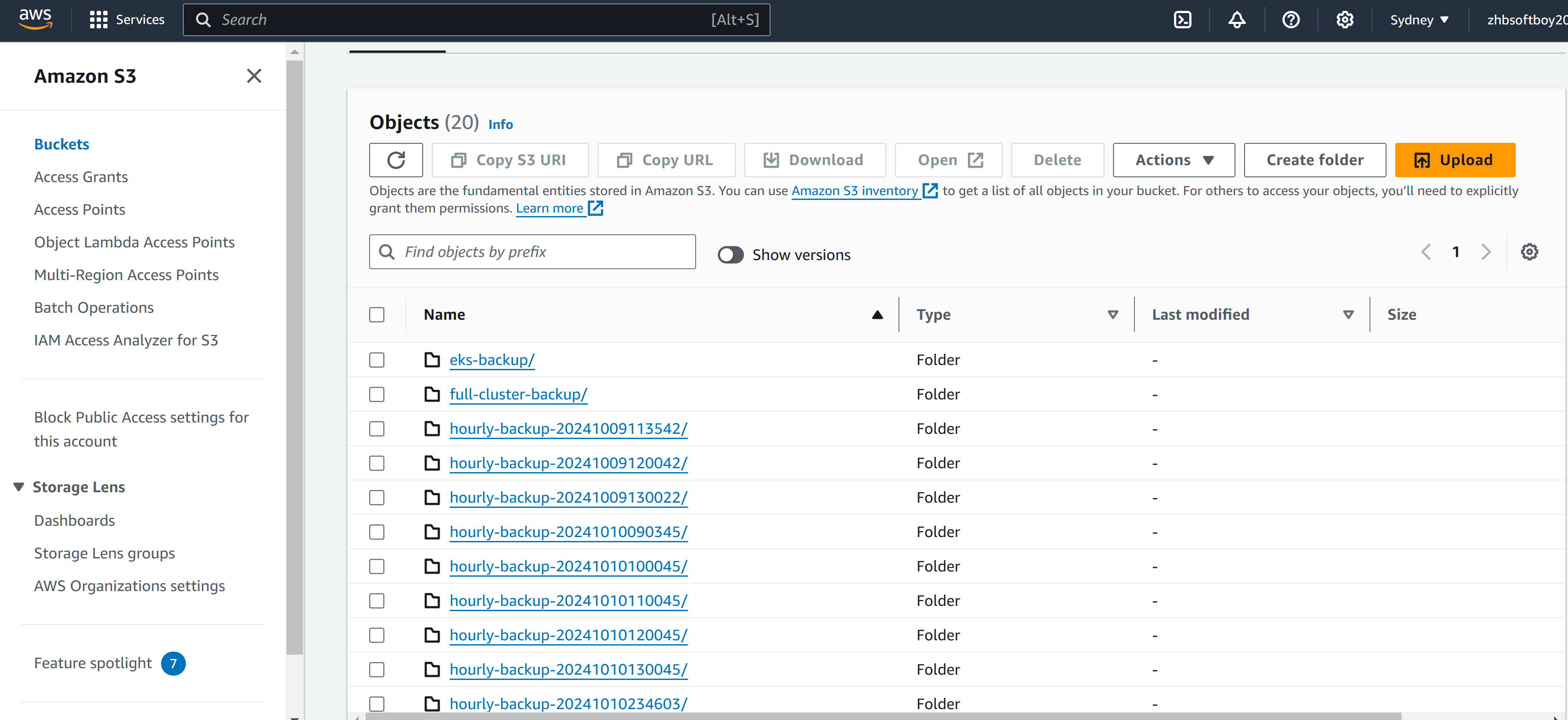
- Cloud backup storage verification
Verify backups in S3 bucket
Conclusion
Here’s a summary of what we covered and achieved in the common Velero administrative tasks for backup and restore on EKS cluster:
- Reliable Backup System: Set up a robust system to back up your Kubernetes cluster, including both application data and persistent volumes.
- Restore Flexibility: Gained the ability to restore the cluster to specific points in time, including partial or full cluster recovery.
- Disaster Recovery: Developed a strategy for recovering from a full cluster failure using Velero and S3 storage.
- Automated Backups: Automated backups with scheduling to ensure that regular backups are taken without manual effort.
- Storage Efficiency: Managed backup retention to save on storage costs and keep backups organized.
- Monitoring and Logs: Monitored the status of all backup and restore tasks through detailed logging and error reporting.