
MLOps - Get Started with KubeRay
Ray is an open-source framework designed for scalable and distributed ML workloads, including training, tuning, and inference. It provides a simple API for scaling Python applications across multiple nodes.
Distributed Training: Easily scale PyTorch, TensorFlow, and other ML jobs across multiple GPUs/instances.Hyperparameter Tuning: Integrates with Optuna and Ray Tune for distributed hyperparameter optimization.Parallel Inference: Supports inference pipelines that scale out dynamically based on demand.Fault Tolerance: If a node fails, Ray can reschedule tasks on other available nodes.
Together with EKS, Karpenter, and Ray, a modern ML team can achieve dynamic Auto-Scaling and GPU resource allocation from local deployment to Running Distributed ML Jobs in Cloud Production environment:
- Dynamic Auto-Scaling: Karpenter scales worker nodes based on Ray’s demand (CPU, GPU, memory). Ray autoscaler scales Ray worker pods dynamically. No need for pre-provisioned expensive GPU nodes.
- Multi-Tenant Resource Sharing and Seamless Transition from Local to Cloud: ML teams can submit workloads without managing Kubernetes pods directly. Ray manages job execution and ensures efficient resource utilization. ML Engineers can run jobs locally with
Ray (ray.init())and later scale seamlessly to AWS EKS by switching toray.init(address=”ray://…”). - Cost Optimization with Spot & On-Demand Nodes: Karpenter provisions spot instances for non-critical ML training. On-demand nodes handle critical, low-latency inference.
Deployed a Ray cluster on Minikube with NVIDIA GPU support
Here I will start a local Minikube Kubernetes Ray deployment to get started with the Ray cluster.
# start minikube with GPU support root@zackz:~# minikube start --driver docker --container-runtime docker --gpus all --force --cpus=12 --memory=36g root@zackz:~# minikube addons enable nvidia-gpu-device-plugin # install ray and ray cluster helm chart on minikube root@zackz:~# helm repo add kuberay https://ray-project.github.io/kuberay-helm/ "kuberay" has been added to your repositories root@zackz:~# helm repo update Hang tight while we grab the latest from your chart repositories... ...Successfully got an update from the "aws-ebs-csi-driver" chart repository ...Successfully got an update from the "kuberay" chart repository ...Successfully got an update from the "karpenter" chart repository ...Successfully got an update from the "eks-charts" chart repository ...Successfully got an update from the "grafana" chart repository ...Successfully got an update from the "external-secrets" chart repository ...Successfully got an update from the "prometheus-community" chart repository Update Complete. ⎈Happy Helming!⎈ root@zackz:~# helm install kuberay-operator kuberay/kuberay-operator NAME: kuberay-operator LAST DEPLOYED: Fri Feb 14 10:26:51 2025 NAMESPACE: default STATUS: deployed REVISION: 1 TEST SUITE: None root@zackz:~# helm install my-ray-cluster kuberay/ray-cluster NAME: my-ray-cluster LAST DEPLOYED: Fri Feb 14 10:27:25 2025 NAMESPACE: default STATUS: deployed REVISION: 1 TEST SUITE: None # check ray pods root@zackz:~# kubectl get pods NAMESPACE NAME READY STATUS RESTARTS AGE default kuberay-operator-975995b7d-xzjd4 1/1 Running 0 2m19s default my-ray-cluster-kuberay-head-q6gcz 1/1 Running 0 105s default my-ray-cluster-kuberay-workergroup-worker-mf5pr 1/1 Running 0 105s root@zackz:~# kubectl get svc NAME TYPE CLUSTER-IP EXTERNAL-IP PORT(S) AGE kuberay-operator ClusterIP 10.98.253.1578080/TCP 2m39s kubernetes ClusterIP 10.96.0.1 443/TCP 20d my-ray-cluster-kuberay-head-svc ClusterIP None 10001/TCP,8265/TCP,8080/TCP,6379/TCP,8000/TCP 2m5s # forward ray dashboard port root@zackz:~# kubectl port-forward svc/my-ray-cluster-kuberay-head-svc 8265:8265 Forwarding from 127.0.0.1:8265 -> 8265 Forwarding from [::1]:8265 -> 8265 Handling connection for 8265
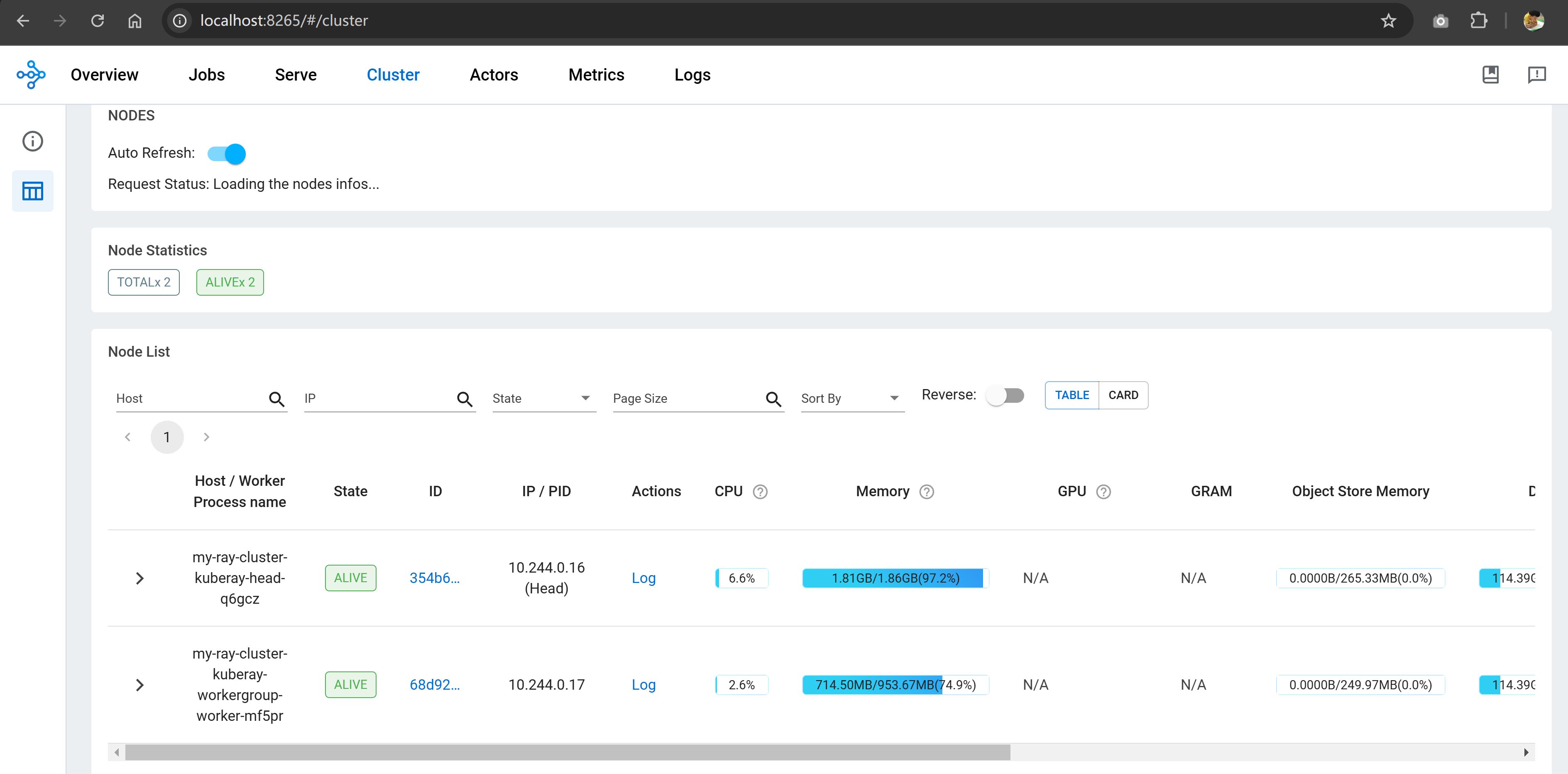
Access Ray dashboard via http://localhost:8265/ to verify Ray cluster head and worker nodes are running properly.
Resource Allocation and GPU training test
Here I exec into Ray head pod to verify the resource and GPU support, and found that the Ray cluster is not configured to use GPU by default helm chart.
root@zackz:~# kubectl exec -it my-ray-cluster-kuberay-head-q6gcz -- bash
(base) ray@my-ray-cluster-kuberay-head-q6gcz:~$ python -c "import ray; ray.init(); print(ray.cluster_resources())"
2025-02-13 15:31:21,699 INFO worker.py:1405 -- Using address 127.0.0.1:6379 set in the environment variable RAY_ADDRESS
2025-02-13 15:31:21,699 INFO worker.py:1540 -- Connecting to existing Ray cluster at address: 10.244.0.16:6379...
2025-02-13 15:31:21,706 INFO worker.py:1715 -- Connected to Ray cluster. View the dashboard at http://10.244.0.16:8265
{'node:__internal_head__': 1.0, 'node:10.244.0.16': 1.0, 'CPU': 2.0, 'memory': 3000000000.0, 'object_store_memory': 540331621.0, 'node:10.244.0.17': 1.0}

(base) ray@my-ray-cluster-kuberay-head-q6gcz:~$ nvidia-smi
bash: nvidia-smi: command not found
Hence I need to create a custom helm chart value file to add GPU resource request for Ray worker node and then update the Ray cluster.
root@zackz:~# helm list
NAME                    NAMESPACE       REVISION        UPDATED                                         STATUS          CHART                   APP VERSION
kuberay-operator        default         1               2025-02-14 10:26:51.403488615 +1100 AEDT        deployed        kuberay-operator-1.2.2

my-ray-cluster          default         1               2025-02-14 10:27:25.186940262 +1100 AEDT        deployed        ray-cluster-1.2.2

root@zackz:~# helm get values my-ray-cluster
USER-SUPPLIED VALUES:
null

vim ray-values.yaml

# Ray version
rayVersion: '2.9.0'

# Image configuration
image:
  repository: rayproject/ray
  tag: "2.9.0"
  pullPolicy: IfNotPresent

head:
  rayStartParams:
    dashboard-host: "0.0.0.0"
    num-cpus: "2"
  resources:
    limits:
      cpu: "2"
      memory: "4Gi"
    requests:
      cpu: "1"
      memory: "2Gi"
  volumeMounts:
    - mountPath: /dev/shm
      name: dshm
  volumes:
    - name: dshm
      emptyDir:
        medium: Memory

worker:
  replicas: 1
  rayStartParams:
    num-cpus: "2"
  resources:
    limits:
      cpu: "4"
      memory: "16Gi"
      nvidia.com/gpu: 1
    requests:
      cpu: "2"
      memory: "8Gi"
  volumeMounts:
    - mountPath: /dev/shm
      name: dshm
  volumes:
    - name: dshm
      emptyDir:
        medium: Memory

root@zackz:/mnt/f/ml-local/local-minikube/ray# helm upgrade my-ray-cluster kuberay/ray-cluster -f ray-values.yaml
Release "my-ray-cluster" has been upgraded. Happy Helming!
NAME: my-ray-cluster
LAST DEPLOYED: Fri Feb 14 11:40:24 2025
NAMESPACE: default
STATUS: deployed
REVISION: 3
TEST SUITE: None
Now I was able to run a Ray task-based workload with memory/custom resource constraints, Adjusted Ray's memory thresholds to avoid OOM kills.
root@zackz:/mnt/f/ml-local/local-minikube/ray# kubectl exec -it my-ray-cluster-kuberay-workergroup-worker-6lcx5 -- bash
(base) ray@my-ray-cluster-kuberay-workergroup-worker-6lcx5:~$ nvidia-smi
Thu Feb 13 19:16:44 2025
+-----------------------------------------------------------------------------------------+
| NVIDIA-SMI 560.35.02              Driver Version: 560.94         CUDA Version: 12.6     |
|-----------------------------------------+------------------------+----------------------|
| GPU  Name                 Persistence-M | Bus-Id          Disp.A | Volatile Uncorr. ECC |
| Fan  Temp   Perf          Pwr:Usage/Cap |           Memory-Usage | GPU-Util  Compute M. |
|                                         |                        |               MIG M. |
|=========================================+========================+======================|
|   0  NVIDIA GeForce RTX 3070 Ti     On  |   00000000:01:00.0  On |                  N/A |
| 47%   45C    P8             19W /  232W |    2955MiB /   8192MiB |     28%      Default |
|                                         |                        |                  N/A |
+-----------------------------------------+------------------------+----------------------|

+-----------------------------------------------------------------------------------------+
| Processes:                                                                              |
|  GPU   GI   CI        PID   Type   Process name                              GPU Memory |
|        ID   ID                                                               Usage      |
|=========================================================================================|
|    0   N/A  N/A        27      G   /Xwayland                                   N/A      |
|    0   N/A  N/A        37      G   /Xwayland                                   N/A      |
+-----------------------------------------------------------------------------------------+

(base) ray@my-ray-cluster-kuberay-workergroup-worker-6lcx5:~$ exit
exit

root@zackz:/mnt/f/ml-local/local-minikube/ray# \

python -c "
import ray
from time import sleep

# Initialize with memory threshold adjustment
ray.init(runtime_env={
    'env_vars': {
        'RAY_memory_monitor_refresh_ms': '0',  # Disable OOM killing
        'RAY_memory_usage_threshold': '0.95'
    }
})

# Specify resource requirements for the task
@ray.remote(
    num_cpus=0.5,              # Use less CPU to allow multiple tasks
    memory=500 * 1024 * 1024,  # Request 500MB memory per task
    resources={'worker': 1}     # Ensure it runs on worker nodes
)
def train_model_simulation(model_id):
    sleep(2)
    return f'Model {model_id} trained'

# Run fewer parallel tasks initially
futures = [train_model_simulation.remote(i) for i in range(2)]
results = ray.get(futures)
print(results)
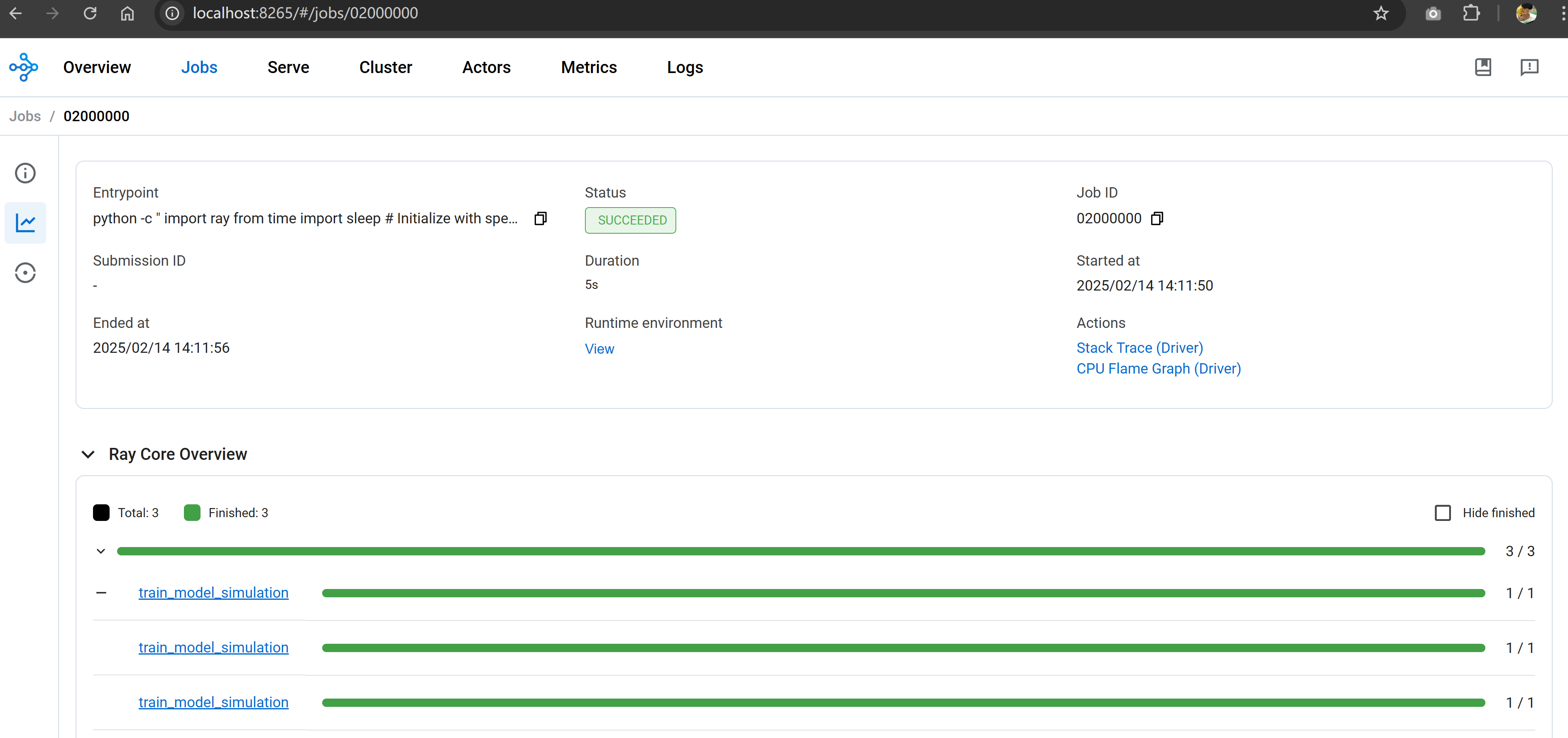
Check the job event and history in Ray dashboard.
Conclusion
Here is what we achieved:
- Ray cluster setup on Local Minikube with GPU support (KubeRay)
- Configuring Ray’s resource limits (memory, CPU allocation per task)
- Running remote tasks efficiently using Ray's distributed execution
- Observing Ray cluster resource usage in real-time
Next step: I will see how to run Ray cluster together with Karpenter on EKS once I have the GPU EC2 instance quota request approved by AWS.