
Jenkins - Multi-Destination CD pipeline with Terraform
"Design a Jenkins pipeline can handle multiple destination: EC2, EKS across different environments"
Jenkins CD Pipeline Design
In last post, I was able to create a Jenkins Universal CI Pipeline to create blog docker image and push to DockerHub:
Jenkins - Universal CI Pipeline with Ansible & Terraform
Now it is time to design the continuous deployment pipeline with Ansible and Terraform for infrastructure provision and application configuration and deployment.
Continuous Deployment Consideration
Continuous deployment will be more Terraform focused. Starting Jenkins CD pipeline with single EC2 instance deployment for Blog website. The pipeline can be reusable for multiple destinations in later design (EC2, ECS, EKS). At the moment, this EC2 deployment can be achieved via below folder structure:
- Jenkins CD pipeline with multi-stage
- Terraform to provision AWS EC2
- Ansible to configure docker and deploy blog
- Validate Web Blog Access
- Delete Terraform Resources
# Tree
terraform-ec2# tree
.
├── Jenkinsfile  # the CD pipeline file
├── deploy-docker-playbook.yml # the Ansible playbook for ec2 webblog deployment
├── hosts # the Ansible inventory file
├── main.tf # the terraform file to provision AWS EC2
├── test-playbook.yaml # the playbook for Ansible testing and validation
└── variables.tf the terraform var file to provision AWS EC2
The CD pipeline design
This Jenkins CD (Continuous Deployment) pipeline covers the following task:
- Jenkins Cred and Environment Setup
- Check Installed Package Versions (AWSCli, Ansible, Terraform)
- Validate Ansible and AWS credential
- Run Terraform Initialization and Apply
- Validate EC2 Readiness and then Deploy Docker Using Ansible
- Validate Web Blog Access by extracting EC2 public IP
- Delete Terraform Resources
Jenkinsfile
# Jenkinsfile
pipeline {
    agent any
    environment {
        IMAGE_NAME = "zackz001/jenkins"
        IMAGE_TAG = "${env.BUILD_NUMBER}"
        LATEST_TAG = "latest"
        EMAIL_RECIPIENT = "[email protected]"
        GIT_REPO_URL = 'https://github.com/ZackZhouHB/zack-gitops-project.git'  // Git repository URL
        GIT_BRANCH = 'jenkins-cd'  // Git branch
        DOCKERHUB_CREDENTIALS_ID = 'dockerhub' // Docker Hub credentials
        REGION = 'ap-southeast-2'  // AWS region
    }
    stages {
        stage('Clean Workspace') {
            steps {
                cleanWs()
            }
       }
        stage('Checkout Code') {
            steps {
                git branch: "${GIT_BRANCH}",
                    credentialsId: 'gittoken',
                    url: "${GIT_REPO_URL}"
            }
        }
        stage('Check Installed Package Versions') {
            steps {
                script {
                    try {
                        // Check Docker version
                        sh '''
                            if command -v docker >/dev/null 2>&1; then
                                echo "Docker Version: $(docker --version)"
                            else
                                echo "Docker is not installed"
                                exit 1
                            fi
                        '''
                    } catch (Exception e) {
                        echo "Error: Docker not found. ${e.message}"
                    }

                    try {
                        // Check Terraform version
                        sh '''
                            if command -v terraform >/dev/null 2>&1; then
                                echo "Terraform Version: $(terraform -version)"
                            else
                                echo "Terraform is not installed"
                                exit 1
                            fi
                        '''
                    } catch (Exception e) {
                        echo "Error: Terraform not found. ${e.message}"
                    }

                    try {
                        // Check Kubectl version
                        sh '''
                            if command -v kubectl >/dev/null 2>&1; then
                                echo "Kubectl Version: $(kubectl version --client)"
                            else
                                echo "Kubectl is not installed"
                                exit 1
                            fi
                        '''
                    } catch (Exception e) {
                        echo "Error: Kubectl not found. ${e.message}"
                    }

                    try {
                        // Check Trivy version
                        sh '''
                            if command -v trivy >/dev/null 2>&1; then
                                echo "Trivy Version: $(trivy --version)"
                            else
                                echo "Trivy is not installed"
                                exit 1
                            fi
                        '''
                    } catch (Exception e) {
                        echo "Error: Trivy not found. ${e.message}"
                    }

                    try {
                        // Check Ansible version
                        sh '''
                            if command -v ansible >/dev/null 2>&1; then
                                echo "Ansible Version: $(ansible --version)"
                            else
                                echo "Ansible is not installed"
                                exit 1
                            fi
                        '''
                    } catch (Exception e) {
                        echo "Error: Ansible not found. ${e.message}"
                    }

                    try {
                        // Check AWS CLI version
                        sh '''
                            if command -v aws >/dev/null 2>&1; then
                                echo "AWS CLI Version: $(aws --version)"
                            else
                                echo "AWS CLI is not installed"
                                exit 1
                            fi
                        '''
                    } catch (Exception e) {
                        echo "Error: AWS CLI not found. ${e.message}"
                    }
                }
            }
        }
        stage('Run a testing Ansible Playbook') {
            steps {
                script {
                    // Run the Ansible playbook using the hosts file from the repo
                    sh '''
                        echo "Running Ansible playbook:"
                        ansible-playbook -i "${WORKSPACE}/jenkins/terraform-ec2/hosts" "${WORKSPACE}/jenkins/terraform-ec2/test-playbook.yaml"
                    '''
                }
            }
        }
        stage('Verify AWS credential') {
            steps {
                withAWS(credentials: 'aws', region: 'ap-southeast-2') { // Replace with correct AWS credentials ID
                    script {
                        // List all existing S3 buckets and output the result to the Jenkins console
                        sh '''
                            echo "Listing all S3 buckets:"
                            aws s3 ls
                        '''
                    }
                }
            }
        }
        stage('Terraform Init and Apply') {
            steps {
                withCredentials([[$class: 'AmazonWebServicesCredentialsBinding', credentialsId: 'aws']]) {
                    sh '''
                        export AWS_ACCESS_KEY_ID=${AWS_ACCESS_KEY_ID}
                        export AWS_SECRET_ACCESS_KEY=${AWS_SECRET_ACCESS_KEY}
                        cd jenkins/terraform-ec2

                        # Check if Terraform has been initialized
                        if [ ! -d ".terraform" ]; then
                            echo "Terraform not initialized. Running 'terraform init'..."
                            terraform init
                        else
                            echo "Terraform already initialized. Skipping 'terraform init'."
                        fi

                        terraform apply -auto-approve -var "aws_region=${REGION}"
                    '''
                }
            }
        }

        stage('Extract EC2 Public IP') {
            steps {
                withCredentials([[$class: 'AmazonWebServicesCredentialsBinding', credentialsId: 'aws']]) {
                    script {
                        def ec2Ip = sh(script: '''
                            cd jenkins/terraform-ec2
                            terraform output -raw ec2_public_ip
                        ''', returnStdout: true).trim()
                        echo "EC2 Public IP: ${ec2Ip}"
                        // Set the environment variable for the next stages explicitly
                        env.EC2_PUBLIC_IP = ec2Ip
                    }
                }
            }
        }


        stage('Validate EC2 Public IP') {
            steps {
                script {
                    sleep 2 // Ensure enough time for variable propagation
                    if (env.EC2_PUBLIC_IP == null || env.EC2_PUBLIC_IP == "") {
                        error "EC2 Public IP is not available or failed to fetch."
                    } else {
                        echo "EC2 Public IP is successfully fetched: ${env.EC2_PUBLIC_IP}"
                    }
                }
            }
        }


        stage('Wait for EC2 Readiness') {
            steps {
                retry(20) { // Retry up to 4 times in case EC2 is not immediately ready
                    sleep 2  // Wait for a bit before checking readiness
                    withCredentials([sshUserPrivateKey(credentialsId: 'sshkey', keyFileVariable: 'SSH_KEY')]) {
                        script {
                            sh "ssh -o StrictHostKeyChecking=no -i ${SSH_KEY} ubuntu@${env.EC2_PUBLIC_IP} 'echo EC2 is ready for deployment'"
                        }
                    }
                }
            }
        }


        stage('Deploy Docker with Ansible') {
            steps {
                withCredentials([sshUserPrivateKey(credentialsId: 'sshkey', keyFileVariable: 'SSH_KEY')]) {
                    script {
                        sh '''
                            echo "Running Ansible Playbook for Docker Deployment..."
                            ansible-playbook -i "${EC2_PUBLIC_IP}," "${WORKSPACE}/jenkins/terraform-ec2/deploy-docker-playbook.yml" \
                            --user ubuntu \
                            --private-key ${SSH_KEY} \
                            --extra-vars "ansible_ssh_private_key_file=${SSH_KEY} ec2_ip=${EC2_PUBLIC_IP}"
                        '''
                    }
                }
            }
        }


        stage('Validate Web Blog Access') {
            steps {
                script {
                    echo "Validating web blog access via http://${env.EC2_PUBLIC_IP}..."

                    // Use curl to validate HTTP response from the web blog
                    def response = sh(script: "curl -o /dev/null -s -w '%{http_code}' http://${env.EC2_PUBLIC_IP}", returnStdout: true).trim()

                    if (response == '200') {
                        echo "Web blog is accessible and returned HTTP status code 200."
                    } else {
                        error "Web blog is not accessible. HTTP status code: ${response}"
                    }
                }
            }
        }

        stage('delete terraform resource') {
            steps {
                withCredentials([[$class: 'AmazonWebServicesCredentialsBinding', credentialsId: 'aws']]) {
                    sh '''
                        export AWS_ACCESS_KEY_ID=${AWS_ACCESS_KEY_ID}
                        export AWS_SECRET_ACCESS_KEY=${AWS_SECRET_ACCESS_KEY}
                        cd jenkins/terraform-ec2

                        # Check if Terraform has been initialized
                        if [ ! -d ".terraform" ]; then
                            echo "Terraform not initialized. Running 'terraform init'..."
                            terraform init
                        else
                            echo "Terraform already initialized. Skipping 'terraform init'."
                        fi

                        terraform destroy -auto-approve -var "aws_region=${REGION}"
                    '''
                }
            }
        }
    }
    post {
        success {
            echo "Pipeline completed successfully."
        }
        failure {
            echo "Pipeline failed."
        }
    }
}
Terraform main.tf
# Terraform main.tf

provider "aws" {
  region = "ap-southeast-2"
}

terraform {
  backend "s3" {
    bucket         = "zz-lambda-tag"
    key            = "terraform/state/terraform.tfstate"
    region         = "ap-southeast-2"
    encrypt        = true
  }
}

# Security Group Data
data "aws_security_group" "existing_sg" {
  filter {
    name   = "group-name"
    values = ["launch-wizard-1"]
  }
}

# Key Pair Data
data "aws_key_pair" "existing_key" {
  key_name = "zzzzzzzzzzzz"
}

# EC2 Instance Definition
resource "aws_instance" "web" {
  ami           = "ami-040e71e7b8391cae4" # Choose AMI
  instance_type = "t2.micro"
  key_name      = data.aws_key_pair.existing_key.key_name
  security_groups = [
    data.aws_security_group.existing_sg.name
  ]

  tags = {
    Name = "Jenkins-EC2"
  }
}

# Output EC2 Public IP
output "ec2_public_ip" {
  value = aws_instance.web.public_ip
}
Ansible Playbook deploy-docker-playbook.yml
# Ansible Playbook for EC2 web blog deployment
---
- hosts: all
  become: yes
  tasks:

    - name: Check if Docker is already installed
      command: docker --version
      register: docker_installed
      ignore_errors: yes
      changed_when: false

    - name: Install required packages (if Docker is not installed)
      apt:
        name:
          - apt-transport-https
          - ca-certificates
          - curl
          - software-properties-common
        state: present
        update_cache: yes
      when: docker_installed.rc != 0

    - name: Add Docker's official GPG key (if Docker is not installed)
      apt_key:
        url: https://download.docker.com/linux/ubuntu/gpg
        state: present
      when: docker_installed.rc != 0

    - name: Add Docker's official APT repository (if Docker is not installed)
      apt_repository:
        repo: deb [arch=amd64] https://download.docker.com/linux/ubuntu {{ ansible_distribution_release }} stable
        state: present
      when: docker_installed.rc != 0

    - name: Update APT cache (if Docker is not installed)
      apt:
        update_cache: yes
      when: docker_installed.rc != 0

    - name: Install Docker CE (if Docker is not installed)
      apt:
        name: docker-ce
        state: present
        update_cache: yes
      when: docker_installed.rc != 0

    - name: Start and enable Docker service
      systemd:
        name: docker
        enabled: yes
        state: started

    - name: Stop all running containers
      shell: docker stop $(docker ps -q)
      ignore_errors: true
      register: stopped_containers

    - name: Remove all stopped containers
      shell: docker rm $(docker ps -a -q)
      when: stopped_containers.rc == 0
      ignore_errors: true

    - name: Pull Docker image
      docker_image:
        name: zackz001/gitops-jekyll
        tag: latest
        source: pull

    - name: Run Docker container
      docker_container:
        name: zackblog
        image: zackz001/gitops-jekyll:latest
        state: started
        restart_policy: unless-stopped
        published_ports:
          - "80:80"
Pipeline debug and testing
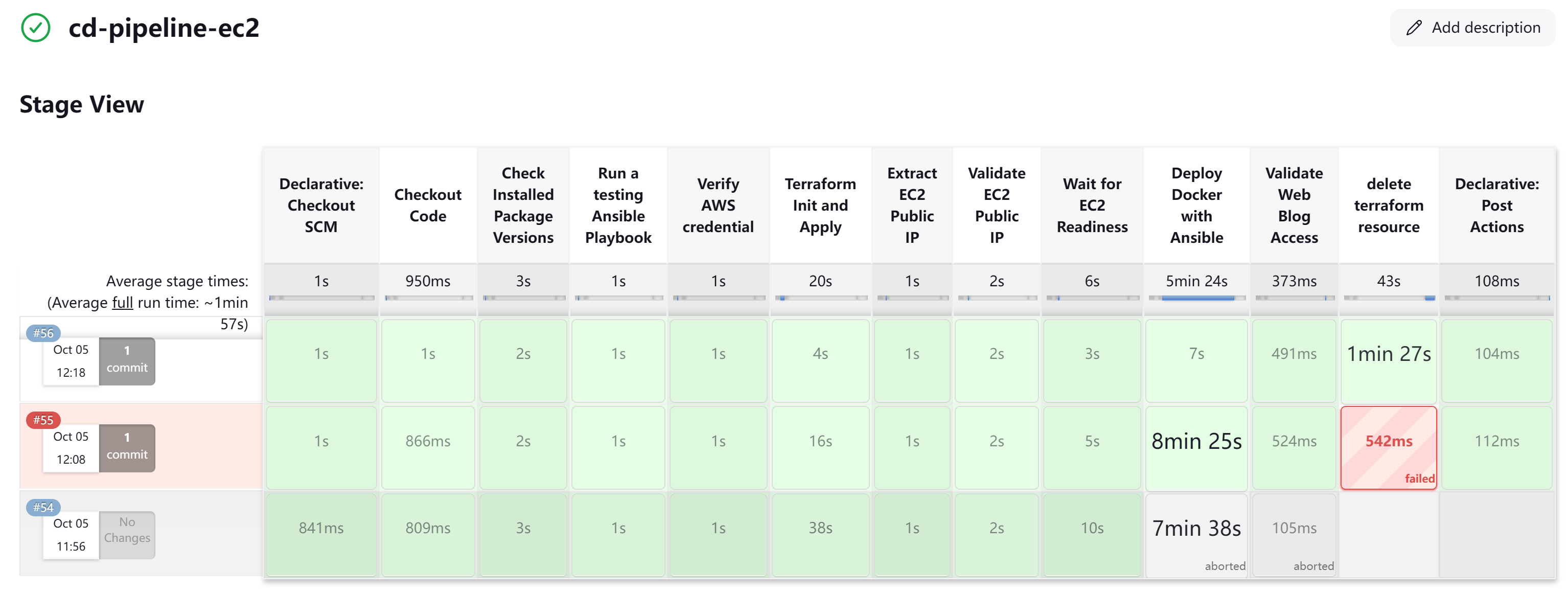
After thorough testing and validation, the CD pipeline also works like a charm.
Terraform Modularization for Multi-Destination Deployment
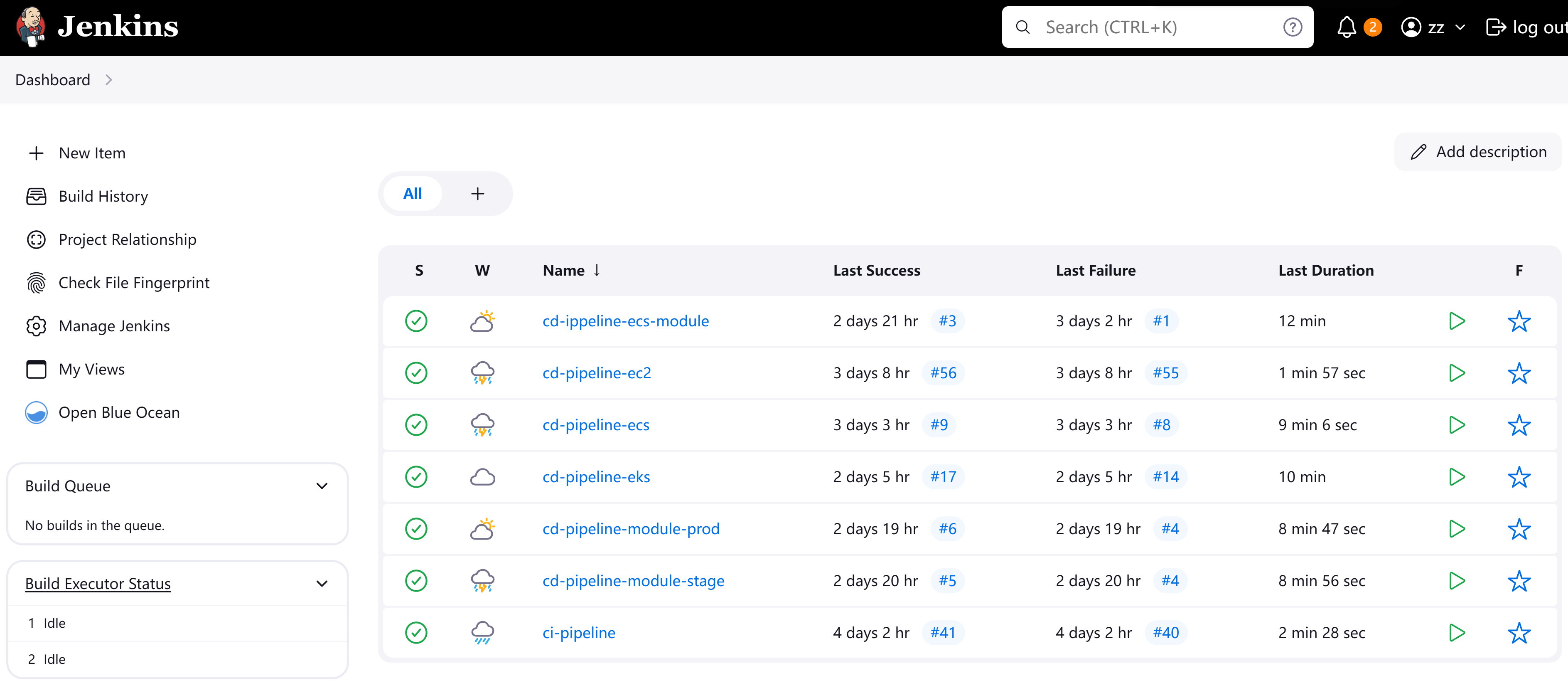
The folder structure below is designed to organize Infrastructure as Code (IaC) using Terraform, breaking down the configuration into reusable modules for ECS, EKS, and EC2 deployments, along with different environments (production, stage, etc.). So The Jenkins reusable CD pipeline can manage multi-destination deployments based on this structure.
- Single EC2 deployment
- Single ECS deployment
- Terraform ECS Module with multi-environment deployment (production and stage)
- Terraform single EKS deployment
- Terraform EKS Module with multi-environment deployment (production and stage)
root@zackz:~/zack-gitops-project/jenkins# tree

├── terraform-ec2
│   ├── Jenkinsfile
│   ├── deploy-docker-playbook.yml
│   ├── hosts
│   ├── main.tf
│   ├── test-playbook.yaml
│   └── variables.tf

├── module-ecs-cluster
│   ├── Jenkinsfile
│   ├── main.tf
│   ├── modules
│   │   ├── alb
│   │   │   ├── main.tf
│   │   │   ├── outputs.tf
│   │   │   └── variables.tf
│   │   ├── ecs_cluster
│   │   │   ├── main.tf
│   │   │   ├── outputs.tf
│   │   │   └── variables.tf
│   │   ├── ecs_service
│   │   │   ├── main.tf
│   │   │   ├── outputs.tf
│   │   │   └── variables.tf
│   │   ├── iam
│   │   │   ├── main.tf
│   │   │   ├── outputs.tf
│   │   │   └── variables.tf
│   │   ├── security_groups
│   │   │   ├── main.tf
│   │   │   ├── outputs.tf
│   │   │   └── variables.tf
│   │   └── task_definition
│   │       ├── main.tf
│   │       ├── outputs.tf
│   │       └── variables.tf
│   ├── outputs.tf
│   ├── terraform.tfstate
│   ├── terraform.tfstate.backup
│   ├── terraform.tfvars
│   └── variables.tf

├── module-ecs-env
│   ├── environments
│   │   ├── production
│   │   │   ├── Jenkinsfile
│   │   │   ├── backend.tf
│   │   │   ├── main.tf
│   │   │   ├── outputs.tf
│   │   │   ├── terraform.tfvars
│   │   │   └── variables.tf
│   │   └── stage
│   │       ├── Jenkinsfile
│   │       ├── backend.tf
│   │       ├── main.tf
│   │       ├── outputs.tf
│   │       ├── terraform.tfvars
│   │       └── variables.tf
│   └── modules
│       ├── alb
│       │   ├── main.tf
│       │   ├── outputs.tf
│       │   └── variables.tf
│       ├── ecs_cluster
│       │   ├── main.tf
│       │   ├── outputs.tf
│       │   └── variables.tf
│       ├── ecs_service
│       │   ├── main.tf
│       │   ├── outputs.tf
│       │   └── variables.tf
│       ├── iam
│       │   ├── main.tf
│       │   ├── outputs.tf
│       │   └── variables.tf
│       ├── security_groups
│       │   ├── main.tf
│       │   ├── outputs.tf
│       │   └── variables.tf
│       └── task_definition
│           ├── main.tf
│           ├── outputs.tf
│           └── variables.tf

└── terraform-eks
    ├── Jenkinsfile
    ├── argo-setup.sh
    ├── backend.tf
    ├── deployment.yaml
    ├── iam.tf
    ├── main.tf
    ├── output.tf
    ├── terraform.tfvars
    └── variables.tf

├── module-eks-env
│   ├── environments
│   │   ├── prod
│   │   │   ├── backend.tf
│   │   │   ├── main.tf
│   │   │   ├── output.tf
│   │   │   ├── provider.tf
│   │   │   └── variables.tf
│   │   └── stage
│   │       ├── backend.tf
│   │       ├── main.tf
│   │       ├── output.tf
│   │       ├── provider.tf
│   │       └── variables.tf
│   └── modules
│       └── eks
│           ├── main.tf
│           ├── output.tf
│           └── variables.tf
Conclusion
Using Terraform and Jenkins practices enables efficient management of complex, multi-environment, and multi-service deployments, which are crucial for cloud-native CI/CD processes to achieve:
- Version Control: Allows tracking and managing infrastructure changes across different environments.
- Multi-Destination Deployment with Jenkins: Enables dynamic deployments to different environments (e.g., production, stage) by passing environment-specific parameters in the pipeline.
- Environment Separation: Each environment (production, stage) has its own Terraform configuration, ensuring proper isolation and customization.
- Terraform Modules Reusability: Reusable modules for infrastructure components (ECS, EKS, etc.) reduce code duplication and simplify updates.
- Multi-Environment and Multi-Component Deployment: Jenkins pipelines can deploy multiple services and environments concurrently by leveraging modular infrastructure and dynamic inputs.
Jenkins Recap Summary
Over this recap for Jenkins, I believe I had achieved:
- Multi-Stage, Multi-Environment Pipelines: These handle conditional execution using when blocks, try-catch for error handling, and post sections for notifications and cleanup.
- Integration with IaC Tools: Seamlessly provisions AWS resources using Terraform or CloudFormation within the pipeline.
- Security and Compliance: Integrates tools like Snyk, Trivy, and SonarQube to perform vulnerability scanning and code quality checks during the build.
- Secret Management: Securely manages sensitive data using AWS Secrets Manager, HashiCorp Vault, or Jenkins credentials plugin.
- Real-World Automation: Solves complex problems and improves efficiency, reducing build times and increasing deployment reliability.